Thursday, May 5, 2016

Bought my second car

This is one of the long due blog posts I had in my head to write for some time.
I wanted to change my car to a somewhat modern looking one after using for 2 and half years. Emphasis on the word "somewhat". Basically what I had in my mind was the Nissan Bluebird Sylphy G10 and the Nissan FB15. I had heard from friends that while they are not really economical in terms of fuel consumption, they make up for that fact by being very comfortable.

I use my cars mostly in weekends so I'm not really bothered about fuel consumption. So I started the car hunting in January of 2014 and was able to find the new love in June. I inspected at least 30 cars during that period . Finally what I bought was not what I initially expected though. I was biased towards the 1.8 liter Bluebird Sylphy over the 1.5 liter version simply because it has more power :) . But good specimens were hard to come by, 1.5 liter version was comparatively available. During this time I also checked out few Nissan N16 Sunnys as well. Basically it's the same car as the Bluebird Sylphy G10, albeit with different engine options and different interior trim levels.

Happiness from seeing your reflection on the paint work is one of those little inexplicable things :)

I was finally able to find an N16 Sunny in reasonably good condition for my budget. During this period I was able to seek a new home for my previous car as well. He was a very good colleague of mine. That was a heart warming moment to see you leave your car at someone else's home. On the flip side of the coin, I get to see the car once in a while since the friend lives close by. Wait! I didn't see him for the last couple of months :(

If you are interested in the specs here is a breakdown.

Model: Nissan N16 Sunny Super Saloon
YOM: 2001
Engine capacity : 1600cc (1.6 liter)
Power: 118hp @ 6000 rpm
Torque: 165Nm @ 4000 rpm

By the way only the Super saloon comes with the 1600cc engine, the Ex Saloon comes with the 1500cc engine which is the same engine used in FB15 Sunny. Note that this applies only to the pre-face-lifted N16 only, the face-lifted N16 ( known as N17 in our market) has even 1300cc Super Saloons. :)

Friday, June 26, 2015

Finally bought a Canon 700D. Happy!!!

I'm not kidding, this was probably one of the toughest decisions I had to take in my life. I had been using a Sony Cyber-shot W230 since 2009. I had this craze to own a DSLR ever since I felt the limitations of my point and shoot camera, which was not so long after I bought it. For me, a DSLR is an expensive investment with nothing in return except for the pleasure factor, so I literally postponed this idea more than a dozen times, though I kept doing my research for a suitable camera. I had Nikon D5200 and Canon 700D in my mind. They were both in the same class but the Canon was a bit pricier. Even after reading so many articles I had this doubt whether to go with the D5200 or the 700D. Nikons have always had better dynamic range in their sensors, similarly I kind of feel Canon has better auto-focus performance. My brain said to go with the Nikon but the heart said to grab the Canon. Overall package wise I felt the Canon was a bit ahead, plus, Canon had me at the killer touch screen implementation. To be honest though, even the day before I bought the Canon, I had not decided on which camera to buy :)


I bought the 700D with the 18-55 IS STM kit lens in April. At the same time bought the 50mm f1.8 Mark II AKA Nifty Fifty as well. Ever since I started reading on photography I always wanted a big aperture lens. I had this lens attached to the body for days without even removing to switch with the 18-55 lens :) 

For the telephoto end I only had limited options. Clearly I couldn’t spend a lot for a hobby with no return on investment so I had only the 75-300 (Non IS) and 55-250 f4-5.6 IS II or STM to choose from. I ordered the 55-250 f4-5.6 STM via Kapruka since it was not available in the local market by then. The lens arrived exactly after one month from ordering. I wasn’t happy with the fact that it took so long. By the time the lens arrived it was available in the local market as well albeit with a slightly higher price tag.

I don’t get to travel a lot, so the chances of capturing something interesting is very slim. Thankfully I have a tree behind my house which is busy with birds which I can easily reach with the 55-250 lens. On the flip side though the birds are of very common varieties. I like to experiment with long exposure and night photography so I bought a cheap tripod from Kandy when I was on a trip. It wasn’t as cheap as in Colombo but I didn’t have to spend more for fuel :)


https://www.flickr.com/photos/132795056@N05/
Strangely, I forgot my login details for my flickr account so I created a new one. I do post some images which I capture with my DSLR on flickr so if you wanna have a look just visit my flickr photostream. I admit they suck, but bear with me as I’m still learning. :)

Friday, November 7, 2014

To upgrade the PC or upgrade the car ?

The last upgrade that went in to the PC was the graphics card I bought nearly 2 years back. In today's standards 2 years is a hell of a lot of time to keep using a graphics card, though I am going to stick to this for a while as I have no plans to upgrade the monitor resolution. The casing has seen many upgrades (perhaps a downgrade too) and it has sheltered the components for 6+ years straight without seeing one major upgrade; the cpu. I bought the E6750 in 2008 February for 25k hoping to keep it for at least 3 years. Anyways the priorities started to change slowly as I bought the first car in 2011. The PC had to take a lower place in the priority list. But hey! this is the gaming season. Call of duty Advanced Warfare is already here, and FarCry 4 is around the corner, perfect time for the long due cpu upgrade. The present cpu has seen its heydays and sadly doesn't have enough grunt to run the latest AAA titles.

I did my home work and figured with the budget I am allocating I can get some non K 4th gen i5 cpu with probably a B85 motherboard. Here I am going to skimp on the motherboard as there is no point spending on a high end one since non K cpus can't be overclocked no thanks to Intel. This would cost me close to 40k. I will be using the existing Ram which I upgraded few years back when the motherboard went kaput.

When I come to think of it, 40k, just for the sake of playing a couple of games this year, is it really worth to spend that much? On the other hand I could spend that money on the new car and take care of the suspension. The front suspension needs attention, probably 2 new shocks and some bushes here and there. I can say for sure the front left shock is a goner as it doesn't make the sound it is supposed to make when you bounce the car several times. Japanese KYB shocks cost close to 10k each, since you should change shocks in pairs it would set back 20k. Add the cost of bushes, labour charges and alignment charges and it will come close to 40k. I could go the cheap route and repair the shocks locally for 7k a pair but I have no faith in them. You should always try to get the genuine or the equivalent OEM parts at least for the critical components.
So the burning question is what should I upgrade?

Thursday, November 14, 2013

Android 4.3 Jelly Bean on Xperia Mini Pro (SK17)

Sony decided that Android 4.0.4 is as good as Xperia mini pro gets, and a lot of other phones for that matter. Ice cream sandwich is no slouch, but no thanks to Java, the UI layer can be cumbersome for phones with slower hardware. Jelly bean to the rescue!. With project butter and various software optimizations the UI layer now can operate at 60 fps for a buttery smooth experience.
So how did I get jellybean on my Xperia ? Keep reading to find out. 

The first thing you have to do is rooting the phone, that's a no brainer eh? Find out how to root your device before everything else. It's usually different from device to device. Next up is unlocking your boot loader. Now some devices have factory unlocked boot loaders, if that's your case consider yourself lucky. This is not to say that others are unlucky, but YMMV. There are some devices where the boot loader is not unlockable. Now this is where most of you will choke and it will cost you money to make it unlockable. I had to pay close to 7 euros to Wotan server to get it done online. Mind you the process involves fiddling with hardware so it's not for the faint of heart. Once you are done you can get your boot loader unlocked with Test point method ( Wotan server also uses this).


When everything is done you are ready to flash that shiny jellybean ROM of yours. At the moment I use Legacy Xperia Jellybean 4.3 ROM which is based on Cyanogen mod 10.2 as the daily driver. You have to extract the ROM and flash the kernel file using the Flashtool. Then boot to recovery (CWM) and proceed to flash the ROM. I have the nAa kernel which is really good and fast. If you need more information on how to flash custom ROMs head over to xda-forums.

Tuesday, April 9, 2013

Bought an Asus X55A

So I had this itch to get a full fledged notebook again for sometime. The Lenovo netbook I had was painfully slow for most tasks. High bitrate 720p video playback was troublesome at times. It was 2years+ old so it was up for an upgrade. I was monitoring the market prices for affordable notebooks for several months. I didn't need a high-end or a gaming notebook since I ain't gonna replace the desktop with laptop as my primary PC. I decided that I should get either a Pentium dual core or a Core i3 based notebook. One thing that does not go well with bugdet offerings is the looks. HP lineup is so fugly with cheap looking glossy plastics. Dell lineup is so boxy. I don't like boxy designs at all. One day I noticed an Asus lappy that was advertised on lapzone dot lk. I've always had a soft spot for Asus in my heart ( Rock Solid - Heart Touching :) ) besides the price was good and it looked great. I read few online reviews and ran to catch a train to Bambalapitiya.

This lapzone store was located directly infront of the Majestic city. I noticed a Lenovo lappy with the same configuration as the ASUS one save for a slightly slower CPU but the rest were same, even the price. Lenovo one looked a little better with it's color scheme and I believe it had a slightly better LCD panel too. I love the Lenovo keyboard BTW. ASUS one carried 2 years hardware warranty from the dealer itself while the Lenovo had only 1 year. Then I bargained it down to a good price and left the place to check other shops out. Asian computers in Unity plaza had few Gigabyte notebooks with 2 years hardware warranty as well. All the laptops in the stores were playing the movie Adventures of Tintin (2011) . Then I noticed a lappy with an absolutely gorgeous LCD panel. It really did stand out from the rest. The colors and contrast were off the chart, so were the viewing angles. I guessed it had an IPS panel, but I don't know how is it feasible to slap an IPS panel in a budget laptop. I'm a bit of a pixel peeper myself but unfortunately it was way over my budget. The lappy was a Gigabyte with a Core i3 CPU btw. There wasn't any particular lappy that caught my eye so I returned to lapzone and bought the Asus lappy I mentioned earlier for Rs 52,500. The model is X55A.
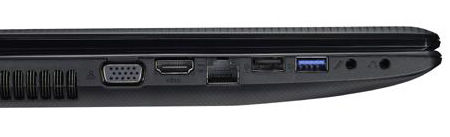
The display is average at best, you can't expect better panels in this price range though. And I usually watch movies on the TV connected to the lappy anyways. One bigger drawback of this lappy is the ports. It has only 2 USB ports (1xUSB3.0 + 1xUSB2.0) and all the ports and power connector are on the left hand side. So it is pretty crowded. Right side houses only the optical drive.

I hate to fiddle with so many cables so I ordered an HDMI cable off eBay to replace my audio and VGA cables that run to the TV set. The old Lenovo didn't sport an HDMI out.
The battery pack is a 47Wh unit. I tested it for the runtime with my HSDPA modem plugged in and it achived not-so-bad 4 hours of web browsing. That means a power usage of 11.75W ( 47Wh/4h) . This was with 30% brightness and Asus battery saver profile enabled. The modem is a mega battery hogger @~2.5W. All the other components use only ~9.25W. My guess is that the lappy should do around 5 hours of surfing with WiFi.


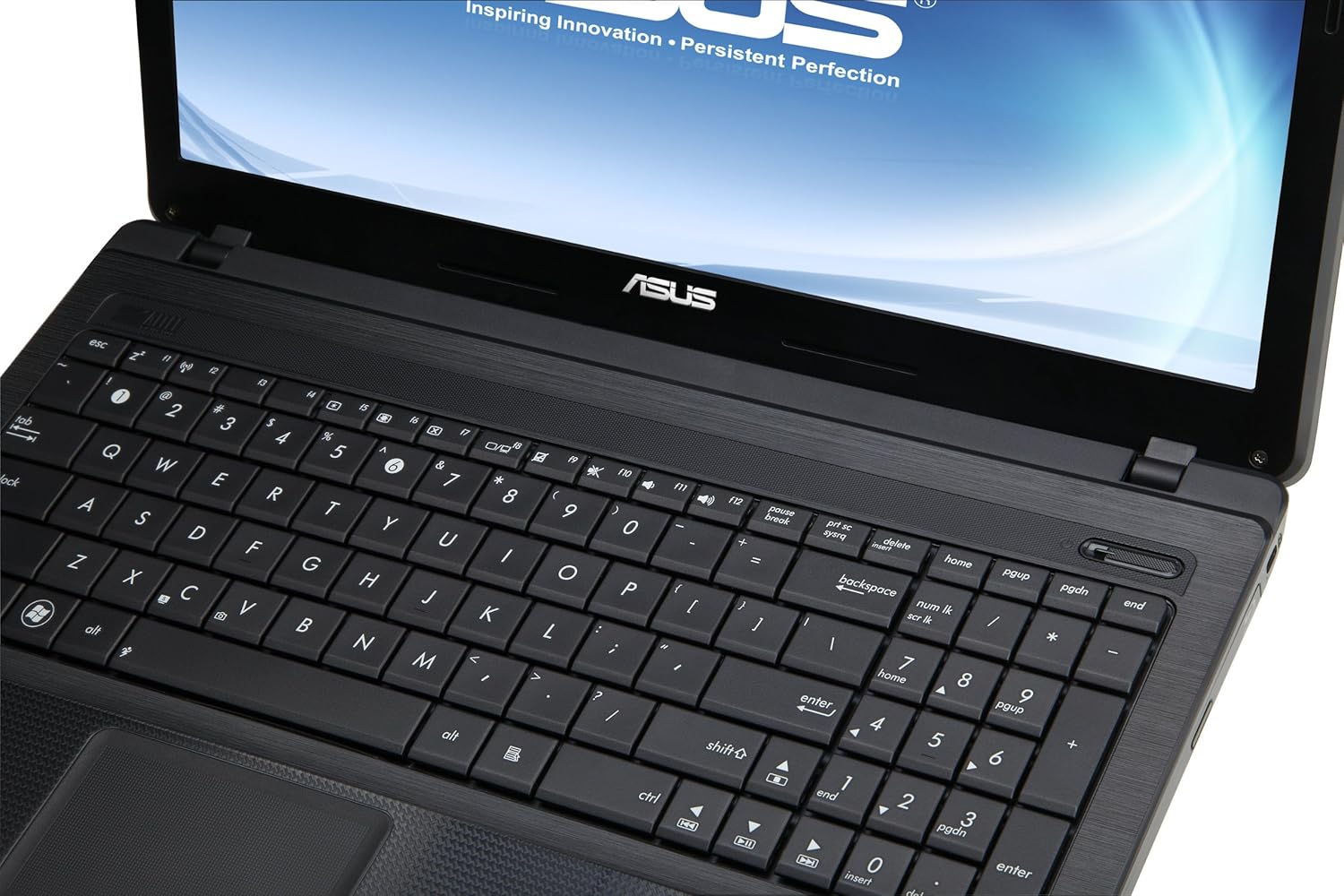
God I miss the Lenovo keyboard, I really do. Keyboard on the Asus is rather unresponsive at times, you have to press on the dead center of the keys to register it. Asus should learn a thing or two from Lenovo on how to make great keyboards.
I don't have many complaints other than the ones I mentioned above. It is really fast for the tasks it is used for. The cpu is B980 @ 2.4GHz ; a cut down version of Sandy Bridge; is nippy enough for day to day tasks, and will serve my needs for at least another 2 years. :)

Tuesday, January 15, 2013

Got myself a GTX650Ti

So I gifted myself a new VGA just in time for the new year. The aged 9800GT died on me few months back so I had no gaming life during the past months so to speak. Oh btw I got a PlayStation2 from a friend of mine and had some fun with it. The old 9800GT was 4 years+ old but still had some kick left in it, but it died and I had to get a new one. Local prices were absurd as usual and a Geforce 650 was around 20K, a GTX 650Ti would set you back a hefty 27K+.

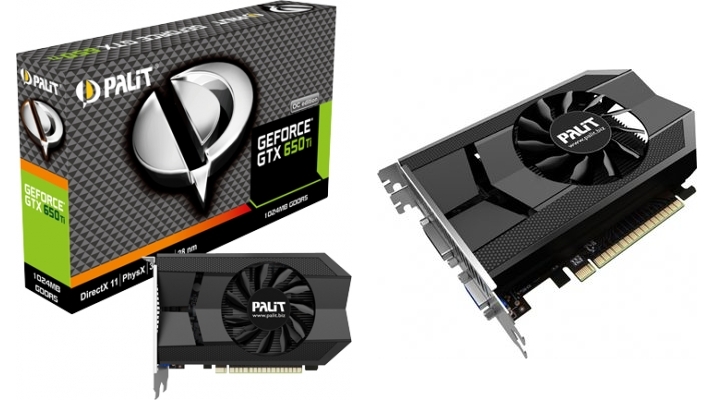
Luckily Anusha  asked me if I want to get one from Japan when he comes to SL in December. So I checked few japanese online stores and opted to get a GTX650Ti made by Palit for JPY11,380 which was roughly equivalent to LKR18,000. That marks it as my 6th encounter with nVidia and I'm yet to buy any ATi/AMD card. Does that make me an nVidia Fanboy ?? :)


One fine Wednesday I met Anusha and got the card from him, oh and I had to bug him to check the card for DOA when he got it from Japan. We had a small mishap with money where I had given him less than the promised amount, managed to solve it but the embarrassment is still there :)

Plugged the card and did the routine installations and voila! Everything is fine. Now I had FarCry3 and Most Wanted pre-installed :) , cranked to max possible graphics quality on FarCry3 and it delivered near 30FPS (@1366x768) during the opening scene, not to say it is playable but still being on a 5 years old CPU ( E6750 overclocked to 3GHz) that is decent. Anyways had to lower some options here and there (specially SSAO) to get it to play at a smooth frame rate. One thing I noticed in FarCry3 was even at 30FPS the game play is nowhere near smooth as it would with Call Of Duty. So some sacrifices with the graphics quality had to be made.

The card is dead silent while sitting at idle and is much much cooler than my old card. To give you some perspective, the 9800GT sat around 58-60C with the fan @ 100% speed, while the 650Ti manages to do away with less than 40C, and that is with the fan @ 35% (Auto). I always had the 9800GT fan at full throttle to avoid any unnecessary overheating.

This was the significant gadget(PC) purchase I did in 2 years so "the itch" to get a new gadget is resisted for few months to come :)

Wednesday, August 22, 2012

Nothing like a trip down the memory lane to recall the hardware of the past.

Do you remember your first PC ? I think everyone does, and will never forget. I got mine as a gift when I was in year 10 in school. It was a used Compaq Prolinea 4/33 with an IBM 14" CRT Monitor, a Compaq keyboard and an IBM mouse :) . I still remember the first day I got it, I had to anxiously wait for an entire day for my parents to bring a power entension cord to power it up. It was loaded with Windows 95 though the hardware was in DOS/Win 3.1 era. The processor was an Intel 486 DX running at mighty 33MHz, coupled with 8MB of RAM and a whopping 120MB Quantum hard disk, with integrated Tseng labs ET4000/W32 VGA with 1MB of VRAM  which I and my friends enjoyed countless hours of  playing Wolf3D and Dangerous Dave with. And that with the annoying (now!) sounds of the PC speaker. Oh I'm getting all nostalgic over and over again. :(

Then came the school holidays. Ours was the only household who had a PC in the area. My friends would wait for my parents to leave the house and sneak in asap. Then they won't leave until the time my parents come back home in the evening. So I usually had my lunch after 5PM :) . Nice memories. I was afraid that the PC would burn from using several hours straight, my fear was quadrupled when I learnt that the CPU didn't have a heatsink or a fan of any sort. Yes! I took apart my very first computer not more than 3 months after getting it. Once we were playing a game during a heavy rain and nearly got struck by lightning. I was nervously waiting for electricity to come back to make sure the PC wasn't kaput. 

I was basically using the PC for playing games and most importantly learning how to use a PC :) Didn't have internet back then so unlike thesedays everthing was learnt by trial and error. With the 120MB of hard drive space I was deleting everything that seemed unnecessary to gain free space, once I deleted io.sys , command.com and msdos.sys files :) and saved the PC miraculously by putting a 3.5" floppy disk with those files at boot time which I brought copied from a Win 98 PC from the school computer lab.
After using nearly 2 years straight, the time came for me to go for a faster PC with multimedia capabilities. So I reluctantly sold it to a friend of mine and got a Pentium 166 (No MMX). 
Though the current PC I use is easily five hundred times faster and has literally 1000+ times memory (8GB) and has blistering fast graphics I will cherish the moments I had with the mighty Compaq Prolinea forever!

Click here to view a disassembled Compaq Prolinea  4/33 in it's full glory.

Monday, January 23, 2012

My New Love :D

I've been out of the blogging scene for almost a year, things are not as same as the university days. Working and having fun doesn't really work out. Finding some time for any tech related activities have been increasingly difficult ever since I started working, let alone playing games. I've been playing Battlefield 3 for the past 4 months, and not even 50% is completed, Sigh! I'm missing the good old days where I used to finish a game within less than a week. :(

And I bought my first ever ride on last october, nothing fancy, a 1994 Sunny, a well kept car by the previous 2 owners and brought down here as brand new. Still there are little things here and there that needs to be attended. I'm a complete n00b to the car scene and sometimes I lose my sleep over the little things :) . I remember the old days when I couldn't sleep peacefully whenever there was a small glitch with the PC. How I wish the cars were as easy as maintaining a PC

Sunday, January 2, 2011

Love you Atom :D

Why would you want a sloppy Atom CPU ticking inside your PC in the first place, either you are not too demanding on hardware or you are a road warrior who wants to squeeze every bit of juice from your laptop battery. While I fall in to the later category, I'm not exactly a road warrior. The main reason of getting the Netbook was the skyrocketing electricity bills in Sri Lanka. My main PC consumes at least 70-80W just for idling (G92 GPU alone eats around 30W :-/). Unless I have games to play, most of the time I spend infront of the PC are low demanding tasks such as Net browsing, downloading and watching movies.

So I bought this Lenovo Ideapad S10-3 Netbook, the battery life is rated as 7hours by Lenovo, I usually get 5hours+ when browsing net with the HSDPA modem. RMClock readings show around 8-10W being consumed during net browsing, and the funny thing is watching standard definition movies only taxes 7-8W of battery power. The culprit is the HSDPA modem that eats 2W+ alone under load.


The only thing I'm dissapointed in is the inability to undervolt the Atom CPU, RMClock doesn't detect the CPU properly ,Crystal CPUID voltage setting option doesn't work and the damn thing idles @ 0.95v while the lowest specified voltage being 0.8v >_<. I think I'll have to live with that until they release a supported version of their software. Apart from that the performance is just OK. I love the portability. I can be with my parents and I don't have to be inside my room ,which I always get shouted at :P

Thursday, October 21, 2010

à·†ෝà¶±් à¶‘à¶šෙà¶±් à·ƒිංà·„à¶½ෙà¶±් à¶´ෝà·ƒ්à¶§් à¶‘à¶šà¶š්!

à¶§ෙà·ƒ්à¶§් කරන්නත් à¶‘à¶š්à¶š à·†ෝà¶±් à¶‘à¶šෙà¶±් à¶¶්à¶½ොà¶œ් à¶´ෝà·ƒ්à¶§් à¶‘à¶šà¶š් à¶½ියන්à¶± à·„ිà¶­ුà¶±. මේà¶šà¶­් මරු à·€ැà¶©à¶š් තමයි à·„ැà¶¶ැයි à¶»ෙà¶±්à¶©à¶»ිà¶±් නම් à¶§ිà¶šà¶š් à¶šේà·ƒ්. à·„à¶»ියට à·€ිà¶±්à¶©ොà·ƒ් XP වගේ. à¶šොà·„ොමත් à·ƒිංà·„à¶½ෙà¶±් à¶½ියන්නනම් අදහසක් à¶±ෑ. à¶§ෙà¶šී à¶‘à·€්à·€ à·ƒිංà·„à¶½ෙà¶±් à¶½ියන්à¶± à¶œියොà¶­් à¶´ිà·ƒ්à·ƒු à·„ැදෙයි :à¶´ී
Published with Blogger-droid v1.6.1

Wednesday, October 20, 2010

Installed Sinhala on Android

Ok, This is a straightforward simple process. But your android handset must be rooted to change anything in your system folders. I used one click root method aka UniversalAndroot to root my X10Mini. (Get it from here)

Then you can use a file manager tool to explore your system files. Make sure your file manager has gotten root permission. You can check apps' root permission using Superuser permissions app (This is a part of the UniversalAndroot app and will be installed automatically when you install UniversalAndroot app).


I used this tool called Root explorer (Get it from here). First you have to mount the file system allowing Read/Write operations. You can simply do this by tapping this "Mount R/W" button.


Grant read/write permission to  /system/fonts folder. 


Then you have to rename or backup your existing DroidSansFallback.ttf in /system/fonts and copy this new DroidSansFallback.ttf (Get it from here)  to /system/fonts. Now you are done. See! That was very easy! Not as easy as installing on Sony Ericsson A200 platform though :D


I believe the author of the above (right)  facebook status wouldn't mind me using it :P

Saturday, October 9, 2010

Why do I hate Apple products

1. Terribly Overpriced.
50k + for iPhone 3G in SL? C'mon!

2. No proper multi tasking.
For the sake of a smooth UI ? Is it really a smart phone?

3. Dumb restrictions.

4. Apple fanboys are annoying (lol)

5. Di*khead CEO.
Published with Blogger-droid v1.6.1

Thursday, September 30, 2010

Test post from blogger for Android

Just wanted to test this Blogger-Droid Application for Android. Hope this might help me to update the blog more frequently :-D
Published with Blogger-droid v1.6.1

Monday, September 27, 2010

From Dumbphone to Smartphone =)

I have been using dumb-phones for around 6 years. They were alright for my day to day needs, not that I didn't miss some features time to time. But they were simple and reliable companions. Then I came across a Samsung i900 Omnia , not as the primary phone though. IMO it wasn't much reliable for my day to day work, battery backup was bad, Sound quality was not up to my standards, Touch screen was an abomination >_<, and not to mention I hated Windows Mobile 6.5 with that resistive touch screen.

My C902 was almost 18 months old (Still rocking) and I wanted a change, Something reliable with good feature set and something "Smart" xD. So it was either Symbian or Android, I had already ditched WinMo after the bad experience with the i900. Funny thing is I always tend to forget iOS as a smart phone OS (You know what I mean :P ).
Symbian is stable and has a lots of applications but at the same time the UI is boring + old skool. Not to mention more and more developers are abandoning the Symbian ship.

I went ahead and bought an Xperia X10 Mini, teh cheapest and smallest Android device on earth. I must tell you, it's an Eagle in a Parrot's clothing, don't be deceived by the looks. The little thing sports a Qualcomm MSM 7227 600MHz CPU, 256MB Ram (128MB user accessible), and all the bells and whistles you could think of, got a pretty decent camera, and heck it's even got the same Adreno 200 GPU as it's big brother Snapdragon Q8250 (as far as my research is correct). UI is very fast, animations are smooth, capacitive touch screen is a treat to use, and since this thing is small (2.6 inch touch screen) it doesn't draw unnecessary attention when I'm travelling in the Bus :D. On the first day I took it to the office most of my office friends asked me "How do I open the slider ? or the Qwerty Keyboard", LOL


In the next post I will upload some of the cool apps I use.
and BTW here is the link for the Phone specs :)

Updating the blog

Hi folks,

After a long break I'm gonna update the blog, and btw, the previous post was regarding my SSD and not having an official TRIM firmware. After fiddling with some custom firmwares and tools now my SSD sports TRIM. :)

That's for now, Adios

Tuesday, December 15, 2009

Getting the SSD finally , but no TRIM yet

So finally I’m getting an SSD kudos to Mahen and Anusha (for dragging me into this :P). "SSD" (Solid state drive) might be an alien term for some of you; it’s a drive that is based on Flash memory cells (unlike your traditional hard disk which is based on a magnetic media). Which is quite fast in terms of sequential transfer speeds, random write/ read speeds and has an ultra low latency (~ 0.1ms) compared to your venerable hard drive (~ 13ms).

The new kid on the block: Kingston SSDNow 40GB MLC boot drive, in fact an Intel X25-M G2 drive in disguise. It comes in 2 retail versions one with the desktop bundle and the other with just the 2.5” (Notebook) drive. We opted to get it from Newegg and Mahen had ordered it through comgateway.com, but few days later we got to know Newegg has run out of stocks and had to search elsewhere. Dell had it but was out of stock, it’s the way it is, they are supposed to sell like hot cakes given the price tag. Then we tried Amazon, they had it but only the Notebook version was readily available, we had no chance but to opt out with it, besides you are not missing much, just the 2.5” to 3.5” enclosure, cables and the CD contains Acronis True Image ; not a deal breaker at all.

As of yet this drive doesn’t support the TRIM extension though Intel has already released a TRIM firmware for their X25-M G2 drives, Hopefully Kingston will release a TRIM firmware once Intel starts shipping their 40GB drives. SSDs degrade their write performance over time, once the cells started to fill up with your data + junk data that you deleted from the drive (you know that a hard drive doesn’t really delete data when you delete a file; same goes with SSD), Let me explain you the reason.

SSDs are made of zillion memory cells each cell holding a single bit, so these cells are grouped together to create a unit called a page (4KB usually). These pages are arranged to create a so called block which is usually 512KB (128 pages). You can write into these pages one by one but when you have to delete a single 4KB page you must erase the entire 512KB block, weird ha? That’s the way it is, you have no way of controlling it. Luckily the SSD controller applies wear-leveling algorithms and it ensures each and every memory cell of the SSD across the drive is used for writing data, thus eliminating writing to the same cell over and over again, but once every cell is used you have to overwrite the existing cells that are filled by junk data you had deleted from windows. This is where it gets interesting. Imagine you have a file to be written which is 256KB in size and imagine the block which is selected by the SSD controller has 256KB of valid and 128KB junk data, so you have 128KB of free space on the block. Your file needs 256KB and the block has 128KB of free space, so the controller needs to erase the 128KB junk data prior to writing your file, as I said earlier the controller can’t just erase a single page or couple of pages, it must erase the whole freakin 512KB block. So the controller reads the block, gets the 256KB of valid data and caches it in the controller cache/ DRAM memory. Now it erases the whole block and writes your file which is 256KB along with data on cache. Wait! What happened? Did the controller write 512KB worth data to the block? Yeah. Feel dizzy? LOL. You wanted to write a 256KB file and ended up reading old 256KB and writing 512KB of data which in turn crippled your write speed severely.

So technically your drive might become slower even when you have plenty of free space on it. TRIM to the rescue, though you need to have a TRIM supported OS (Win 7) and a TRIM supported firmware with your drive. When TRIM is enabled a simple delete operation you pass to the OS goes through the SATA controller of your motherboard from all the way up to the SSD controller and it really erases the deleted file from your drive. So your drive is free from junk data and it’s always ready for writing to it the absolute data you want. Delete operations may become slower since it has to do all the boring read-erase-write operations. That’s not a big deal. Remember if your drive doesn't support TRIM you have no way of regaining the full performance unless you secure erase the drive, formatting or partitioning cannot help here. So that's it for now, Sorry if it was boring to you. :D

Hopefully we will get the SSDs before this weekend and planning to visit Mahen’s place to eyewitness his Alienware-MX17, that’s a once in a lifetime chance for me I guess. catch ya' all later.

Peace out!


Saturday, April 11, 2009

Impressions on Sony Ericsson C902


It’s been a month since I bought my shiny, brand spanking Sony Ericsson C902. I never thought I would caught up with this mobile mania, My K550i (@W610i) wasn’t bad at all, due to some *sweet* reason I decided to buy a new mobile. There were few contenders in my dream list, as I’m aiming for not so high (lol) they were not that expensive or dreamy for most of the guys... he he.

Here are my concerns.

1). Fast UI.
2). Multi tasking capability.
3). Good Camera. (Well! Better than my modded K550i)
4). Good Multimedia capabilities.
5). Can it be modded to my needs. ?
6). Good battery life.
And here are the few contenders.

1). Nokia 6500Slide. (S40 / Lacks Multi tasking: Crap)
2). Nokia 6220Classic. (S60 / Great camera, Multi tasking, el-cheapo look though :-/ )
3). Sony Ericsson K850i. (A200 / Superb Camera, Multi tasking, great look, chubby though :-/ )
4) .Sony Ericsson C902. (A200 / Great camera, Multi tasking, slim sexy spy (lol) look, relatively smallish screen :-/ )

So the C902 finally won my heart and cost me 35K. Hehe.

Here are the pros,
1). Well built very slim metal body.
2). Exceptional, stylish camera slider.
3). 5MP Auto Focus Camera with Face Detection, Geo Tagging ( Saves the accurate location of the photo taken in EXIF information, and can be viewed on a map /flickr yada yada) and all new Photo Flash+ 8 Touch sensitive Camera buttons. (After all it's a CyberShot :-) )


4). Great multimedia capabilities. (Super fast Media manager , handles 5MP pics each about 2MB like nothing)
5). Accelerometer sensor.
6). HSDPA- 3.6Mbps : w00t!
7). One of the best displays of SE : Great sunlight legibility.
8). Smart search for contacts, filter SMS into categories.
9). Track ID Music recognition (It Rocks)
This screen shot is from a live footage of mine. lol (Refer the previous post for full details)


10) .Yeah baby! This (A200) can be modded .. :)
11). Great battery life.

Unfortunately here are the cons,

1). Slower UI compared to my K550i :( (Still C902 wins hands down in media playback)
2). Photo flash is not as powerful as Xenon or as SE suggests.
3). Smallish screen. 2.0” (Coz of 8 Touch sensitive camera buttons around the screen)
4). Distant Night shots are far from perfection due to underpowered LED flash, not a complete disaster either.. lol
5). Display is a Fingerprint magnet

Click to view the full sized image

As you can see there are many reasons to buy this nifty thing though there are few drawbacks as well, who cares ? Nothing is perfect.. lol
As a whole I'm satisfied with SE C902 and recommend to everyone
P.S: On a side note I would like to mention that this is the James Bond's phone in Quantum of Solace :P
Pictures : Courtesy of a 5610XM (Yohan :-) )

Monday, March 9, 2009

Sony Ericsson TrackID™ FTW! lol

Today I came up with a cool free feature that Sony Ericsson brought to the table; "TrackID" : TrackID is a nifty tool you may find mostly in W series phones.. I'll tell you how I suddenly become a fan of this tool. I was watching SmallVille on my PC and usually at the end where it becomes sensitive (lol) there was a nice background song playing. It was really nice so I wanted to download the original track. But who is the Artist ? Title of the Song ? Album ?.. I just held my mobile few cms near to the PC speakers, started the trackID service, within like 15seconds - Violah!!. I got the Artist, Track, and Album info directly to my mobile freely..
TrackID was the most handy tool I've ever seen on a mobile phone..
How it Works
1. When music fans hear a song they want to identify, they tap a command on the phone keypad to start the audio recognition process, and then hold the phone up to the music source.
2. The phone captures a few seconds of the audio and extracts a waveform fingerprint of the snippet. The snippet can be from any section of the song, even the last few seconds.
3. The fingerprint is sent to the Mobile MusicID recognition service from the service provider that may be located anywhere in the world.
4. The Mobile MusicID recognition server compares the fingerprint to its database of reference fingerprints and responds with the exact match.
5. The artist, song title and related information, as well as content like album art and download links are relayed to the fan.

Official Page

Monday, February 2, 2009

Does your HSPA modem heat up ?

Long time no see ? lol
OK, I made up my mind buying the Dialog HSPA Uni student package on the day before yesterday.. It is pretty much fast despite the fact that I have very low signal reception at my home. Even when the signal strength was 20% I got around 200-220KBps with IDM.
One thing I noticed was this teenie weenie modem (Huawei E220) heats up pretty much. Even though it may not be a problem for this I thought to add some sort of a heatsink to this. So I grabbed my old dead (sob sob) ASUS P4PE2-X mobo off my junk yard (lol) and removed the Northbridge heatsink, and placed the modem on the heatsink as this, (Edit:: The Heatsink is replaced with up side down now. There was a rubber substance on the Heat sink spreader so till I remove it using some chemicals I had to use it like this)


Although this is a very inefficient method (surfaces are barely touched) I noticed some considerable amount of heat level drops off the modem.
Here is a little video clip to show you how does it look like ( Sorry for the lower frame rate as the blogger has encoded it with a low frame rate)

Thursday, January 29, 2009

Stuck at 4GHz with the Phenom II X4 940...

When Anusha showed me this I was like WTF!
Here's the full article for you from Anandtech.


/***************************************/

We have been testing the overclocking capabilities of the Phenom II X4 940 (seriously, who names these products?) for an AMD roundup and have hit the proverbial brick wall. It has not been for the lack of trying or even using a stellar motherboard to test these processors. The motherboard choices have ranged from some wicked little 790GX overclockers from ASRock, Gigabyte, and DFI to the flagship 790FX products from ASUS, MSI, and Foxconn. We even tried a few NVIDIA 780a based motherboards along with a slew of newly arrived AM3 compatible boards. We changed cooling, processors, video cards, disk drives, memory, and tried every available voltage setting. It did not matter. We could not break the 4GHz barrier and still complete our benchmark test suite.
The only commonality between our 30 different setups is the operating system. We recently standardized on Vista Ultimate 64 SP1 for testing. Granted, we had this same problem when our 940 engineering samples first arrived and we asked AMD about it. However, AMD never did get to the bottom of it before the launch date. We thought our results might change with retail processors. Alas, they did not. We have four retail CPUs, three with 0850 lot codes and one from the 0849 batch that all behave the same way under Vista 64.
Our final benchmark stable clock speed is 3.955GHz reached via a 17.5 core multiplier and a 226 HTT setting on our . This required a 1.6V VCore setting (with droop, real voltage is around 1.585V) on our DFI DK 790FXB-M2RSH motherboard. Memory speed is DDR2-1205 at 5-5-5-18 timings with VDimm at 2.060V. This is the setting we will utilize in our upcoming roundups. We mention it now as our Core i7 920 will operate at 4GHz and Q9550 at 4.25GHz, not exactly fair, but we are looking at platform capabilities on air cooling in the overclocked sections. As one would say, it what it is.


What is really strange is the behavior of the OS and Phenom II X4 940 at the 4GHz mark. We actually have 3.990GHz (19x210) stable for all tests except Crysis and the PCMark Vantage TV/Movies test suite. With that in mind, a simple change to 19x211 for a 4.009GHz clock speed results in the majority of our tests failing. We sometimes have trouble even entering Vista at 19x211, while 19x210 is about 97% benchmark stable. We have tried every possible combination (20x200, memory at DDR2-800, 1GHz NB speed, etc.) and even chilled the processor down to 16C and raised processor voltages above 1.7, nothing worked above 4GHz.
At least under Vista 64 as Vista 32 was much different. The settings mentioned earlier allowed us to reach a stable 4.275GHz (19x225) with the same components. However, we are not utilizing Vista 32 in testing anymore, especially considering our standard benchmarks are completed with 4GB and 8GB configurations on the DDR2 platforms. As such, it appears at this time that any overclocking comparisons will be limited to under 4GHz on the AM2+ and AM3 platforms. We have addressed this problem with AMD again and hopefully an answer is forthcoming. In the meantime, we figured out a way to get a screenshot above 4GHz before we received the standard BSOD routine. At least it is a consolation prize at this point.